KingFox Esport Logo Vol 01: A Foundation for Your Gaming Identity
Building a visual identity for your esports squad, gaming brand, or content channel is a significant step. It’s more than just a pretty picture; it’s the emblem that represents your team’s spirit on stream, on social media, and in competition. Many creators and teams rush this process, often settling for generic, low-quality assets that fail to grow with their ambitions. This is where a professional, editable logo pack like KingFox Esport Logo Vol 01 becomes a critical tool, not just a purchase.
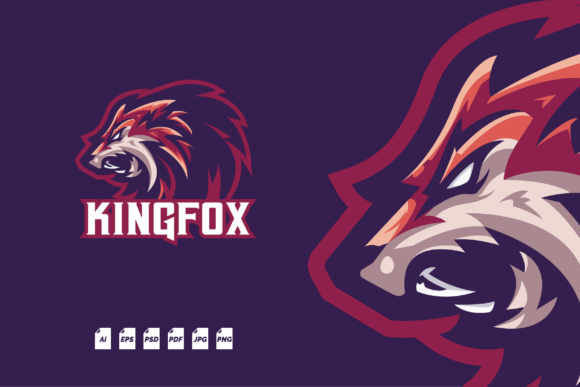
KingFox Esport Logo Vol 01 is a comprehensive, high-quality vector logo template designed specifically for the gaming ecosystem. Its core value lies in its flexibility. You receive a fully crafted, stylized fox-themed emblem—a popular motif symbolizing cunning and agility—but it’s not a static image. Provided in multiple formats including PSD, AI, and EPS, the logo is built on well-organized layers using only free fonts. This means you, or a designer you hire, can easily adjust colors, tweak elements, or integrate it into broader branding without starting from scratch. The 1000 x 1000 px RGB artboard ensures it’s ready for digital use everywhere, from team jersey mockups to Twitch overlays.
Overlooked Details When Choosing a Logo Template
A common misunderstanding is treating a logo template as a final, unchangeable product. People download a JPEG, slap it on their channel, and consider the job done. This approach locks you into a single resolution and color scheme. If you later want to print merchandise or need a dark mode variant for a new UI, that static JPEG becomes a limitation. KingFox Esport Logo Vol 01, by providing the source vector files, solves this, but you must utilize them.
The practical mistake here is not planning for evolution. Your team’s brand will evolve. A better approach is to treat the template as your brand’s foundation. Before even applying the logo, open the EPS or AI file in your software and experiment. Change the accent colors to match your existing palette. See how the layered elements can be separated for use as icons. This initial exploration ensures the asset becomes truly yours.
The Critical Step Everyone Misses: Font Installation
The package includes a clear note: install the free fonts first. Skipping this step is a frequent error that leads to immediate frustration. Opening the PSD file without the required fonts activated will cause text layers to default to a substitute font, often distorting the logo’s intended balance and style. This can make the logo look cheap or broken, undermining its professional quality.
Always locate the Readme.txt file first. It contains the links or names of the free fonts used. Download and install these fonts on your system before opening any of the editable design files. This simple, five-minute preventative task ensures everything displays correctly from the start, preserving the logo’s integrity and saving you time troubleshooting design software warnings.
Vector Quality: The Difference Between Scalable and Stretched
Many beginners undervalue the “high-quality vector” feature. They might use the provided PNG for a website header, but when needing a larger version for a tournament banner, they simply enlarge the PNG. This results in a blurry, pixelated presentation that damages your brand’s perceived professionalism. The vector files (AI, EPS, PDF) are the solution. Vector graphics use mathematical paths, not pixels, meaning they can be scaled to any size—from a tiny Discord avatar to a massive billboard—without any loss of sharpness.
When you need to resize, always use the vector source files. If you’re not comfortable with Adobe Illustrator, the included PDF vector file can often be opened and resized in more accessible programs. Checking that you have software capable of handling these formats (even free alternatives like Inkscape) before purchase is a wise move.
Organization is Efficiency: Navigating Well-Organized Layers
For those who wish to customize, the “well-organized layers” feature is a godsend. A poorly layered file is a maze where modifying a single color can take an hour of hunting. KingFox Esport Logo Vol 01 is structured for clarity. Each logical part of the logo—the fox outline, primary fill, secondary details, text elements—should be on separate, named layers or groups. This allows for quick, targeted edits.
If you’re delegating customization to a freelance designer, this organization directly reduces cost and time. You can provide clear instructions like “please change the color of layer ‘Main_Fox_Outline’ to blue.” Without organized layers, the designer’s quote would be higher due to the extra labor involved. Before commissioning work, open the PSD or AI file yourself and browse the layer panel. Understanding its structure helps you communicate your vision more effectively.
Understanding File Formats and Their Uses
Receiving six different file formats (PSD, AI, EPS, JPEG, PNG, PDF) can be overwhelming. Misusing them is common. The JPEG and PNG are your final-use, raster formats. Use the PNG (with transparency) for web graphics, overlays, and digital avatars. Use the high-resolution JPEG for situations where transparency isn’t needed, like simple social media posts.
The PSD, AI, EPS, and PDF are your editable and scalable source files. The PSD is for Adobe Photoshop, ideal for pixel-level adjustments or integrating the logo into complex image-based mockups. The AI and EPS files are for vector editing in Adobe Illustrator or CorelDRAW, essential for color changes, shape modifications, and infinite scaling. The PDF vector file is a versatile option that can be viewed by almost anyone and still retains scalability for many print applications. Match the format to your task: edit with the vectors, deploy with the raster images.
Remember, the mockups shown in the product preview are for demonstration only. They illustrate potential applications, but your final branded merchandise or stream overlay will be created by applying your customized logo to your own mockup templates or designs.
A Realistic Approach Before You Commit
Before deciding if KingFox Esport Logo Vol 01 is right for you, conduct a quick audit of your needs. Do you have a short-term need for a static image, or a long-term vision for a brand that will adapt? If it’s the latter, an editable template is prudent. Do you have access to, or basic knowledge of, design software to utilize the vector files? If not, consider the cost of hiring a designer for minor customization versus the cost and limitation of commissioning a completely original logo from scratch. Often, starting with a robust template like this is a more efficient middle path.
Finally, ensure the aesthetic aligns with your desired tone. The fox motif conveys cleverness and speed. If that symbolism resonates with your team’s identity, the template is a strong fit. If not, the extensive customizability means you can still alter it significantly, but the core shape will remain. View it as a starting point—a high-quality, professional starting point that saves you from the common pitfalls of a DIY logo made from stock elements, giving you the control to build a unique identity without beginning from a blank page.